NBC Sports
- 2.8
- Rating
- 1.00M
- Installs
- Free
- Price

 Analysis by App-foxy
Watching live sport on a phone sounds simple until the important moment arrives and the app needs to keep up with a full broadcast, changing network conditions, and a device that may already be busy. I spent time looking at NBC Sports with that practical question in mind: is it a dependable way to follow NBC’s sports coverage and related television programming, or is it mainly useful as a backup to a television? My answer is fairly balanced. It is a convenient, free sports app from NBCUniversal Media, LLC, but its real value depends on your connection, your device, and whether the event you want is available through your viewing setup.
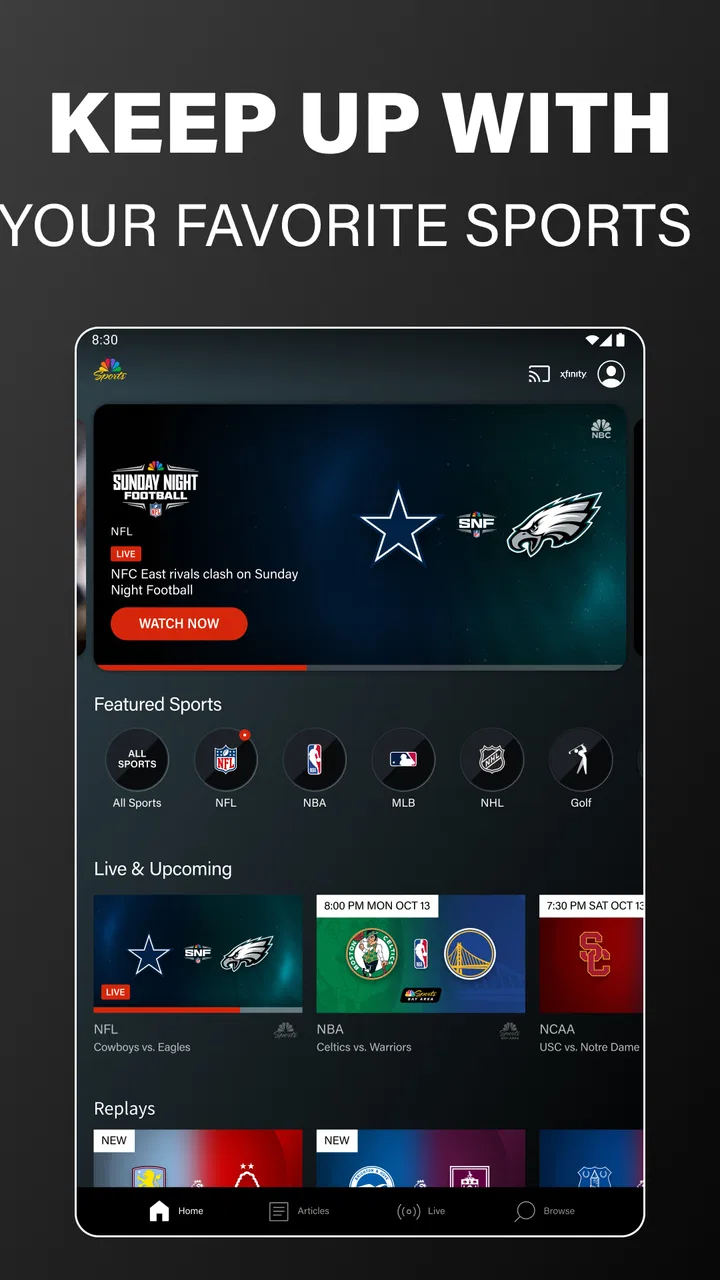
The app sits in the sports category and is aimed at people who want access to live sporting events, Sunday Night Football, and selected NBC television shows in one place. That combination makes it more than a score tracker, yet it also means the experience is tied to video playback rather than quick glances at results. I would recommend it most readily to someone who already follows NBC sports coverage and wants a mobile option for the kitchen, commute, hotel room, or another place where a television is inconvenient.
How NBC Sports feels during real viewing
When I assess NBC Sports, I start with the viewing choice in front of me: a dedicated app from NBCUniversal Media, LLC, or a lighter scores service that asks less of a phone. I’d use this one when the broadcast itself matters, but I wouldn’t assume convenience alone makes it the right fit. The next thing I’d check is what control I can actually exercise before and during a viewing session.
You May Also Like

 Blood Strike: 2.5 Anniversary
Blood Strike’s Loadouts Turn Every Drop Into a Tactical Gamble
A close look at Blood Strike’s custom loadouts: how fast access to signature weapons reshapes its battle royale rhythm, rewards preparation, and narrows the gap between fights.

 Pandora - Music & Podcasts
Pandora’s Music Is Easy to Start, but Harder to Recover
Pandora’s strength is its low-effort path from a seed to a station. Its weak spot is how much confidence it asks you to place in connection, setup, and quiet recovery.

 8 Ball Pool
 Is Built on Rivalries, Rematches, and Routine
A close look at the rivalries, rematches, shared routines, and unanswered safety questions that turn a quick pool match into a persistent mobile community.

 Samsung Music
’s Quiet Strength Is Playing What You Already Own
Its reach comes less from spectacle than from dependable access to a personal library. That simplicity is both the app’s strongest retention engine and its ceiling.

 AccuWeather: Weather Radar
AccuWeather Review: A Quick, Clear Forecast for Everyday Decisions
For everyday plans, the best forecast is the one you can understand quickly. AccuWeather makes rain timing, radar, and local conditions easy to act on, with a few trade-offs.

 Hill Climb Racing
Why Hill Climb Racing Still Turns Crashes Into One More Run
A tiny car, a bumpy hill and one more upgrade: Hill Climb Racing keeps resurfacing because its simple chaos makes every near-miss feel personal.
More From Our News Desk



Speed expectations before the action starts
My first impression is that the app’s usefulness is less about flashy navigation and more about getting from the opening screen to the content you came to watch. A sports application has a narrow window in which it must feel ready: if a match or football game is already underway, browsing is not the priority. The important test is whether you can identify the relevant live coverage without wandering through unrelated entertainment.
That is where I would set realistic expectations. NBC Sports is not a lightweight scores-only tool. Live video naturally asks more from the phone than a text schedule or a simple news feed, so the app can feel more demanding during playback than conventional sports alternatives. If you only want a score, a dedicated results app is usually quicker and more efficient. If you want the actual broadcast, however, a scores app cannot replace what this one is designed to provide.
The free price is a strong reason to keep it installed, especially for occasional viewing. Still, “free” does not mean every viewing situation will be equally straightforward. Access to live programming can depend on the event and the viewing arrangement associated with the service. I would install it before game day rather than waiting until the opening whistle, then check that the app opens properly and that I can reach the intended coverage. That small preparation removes much of the avoidable stress.
One useful habit is to use the app for the broadcast and another tool for quick context. I prefer NBC Sports when I want commentary, pictures, and the feeling of following the event as it happens. For a fast check of a score while my phone is nearly out of battery, a simpler sports service makes more sense. This is not a weakness unique to NBC Sports; it is the basic trade-off between rich video and low-resource information.
What happens during heavy-use moments
The most demanding situation is not casually browsing a program page. It is a high-interest live event when many viewers are likely doing the same thing and when the phone may be receiving notifications, switching between applications, or working on a less-than-perfect mobile connection. In that situation, I judge the app by how gracefully it handles interruption and recovery, not just by how attractive the first screen looks.
For a realistic everyday example, imagine following Sunday Night Football while preparing dinner. I might begin watching in the living room, pause to move around the kitchen, then return to the phone when a key drive begins. That workflow is exactly where a mobile sports app earns its place. It saves me from being tied to one television, but it also exposes the practical costs of mobile viewing: the phone can become warm, the battery can fall faster than it would during ordinary browsing, and a weak signal can make the experience less comfortable.
I would avoid treating the app as a background audio player unless I had already tested that behavior on my own device and setup. Live sports video is best approached as an active viewing session. If I need to leave the app for a message or a map, I expect to spend a moment checking whether playback resumes cleanly. That is a sensible precaution with any live-streaming application, and it matters more here than it would with a static article.
Another practical tip is to reduce unnecessary competition for the connection. Before starting an important event, I close apps that are actively using data, connect to a stable network when possible, and keep the phone charged. These steps do not change NBC Sports itself, but they improve the conditions in which it has to work. They also make it easier to tell whether a problem comes from the app or from the device and network around it.
Reliability, interruptions, and getting back into the action
Reliability is the area where I would keep expectations measured. A live broadcast is more sensitive to interruptions than an on-demand clip because there is no convenient moment to wait for later. If playback stops during a decisive play, the ability to return quickly matters more than a polished menu. I therefore see recovery as part of the app’s everyday usability, even though the exact result can vary with the phone and connection.
My advice is to reopen the app calmly rather than repeatedly tapping every control. When a stream is interrupted, I first check the connection, then return to the relevant live content and give playback a moment to re-establish. Rapidly switching between screens can make it harder to know whether the issue is loading, authentication, or a temporary network change. This simple sequence is one of the more useful habits for anyone using the app away from a reliable home setup.
The app’s broad purpose can also create a small reliability challenge for decision-making. Someone opening it for a particular game may encounter a mixture of sports coverage and NBC television content, so it helps to know exactly what you are looking for before launching it. I would save the event name in my head, check the live area first, and avoid spending time browsing general programming while the event is already in progress.
Its audience size suggests that this is not an obscure experiment. NBC Sports has passed the one-million-install mark, and its average rating is 2.8 from roughly 462 ratings. I read that combination as a sign of a recognizable app with a mixed user experience rather than a universal recommendation. The rating is low enough that I would not promise flawless performance, but the install reach shows why it remains relevant to viewers who want NBC’s sports content on a mobile device.
Device limits and resource demands
The technical baseline is reasonably approachable: the current version is 9.26.0 and it supports Android 7.0 or later. That makes it available to many older Android phones, but compatibility is not the same as comfort. A phone may be able to install an app and still be a poor place for extended live video if its battery is worn, its storage is nearly full, or its processor struggles with modern streaming workloads.
I would pay special attention to three constraints. The first is battery life. Watching a full event on a phone can consume considerably more power than reading scores, so a charger or power bank is sensible for long sessions. The second is heat. A device that is already warm from navigation, gaming, or direct sunlight may become less comfortable during sustained video playback. The third is screen size. The app can make a phone useful in a pinch, but a tablet or television remains better for detailed action and group viewing.
Older hardware may also make transitions feel less immediate, particularly when moving between a live stream and another part of the app. I would not judge the service solely by how fast it opens on a recent phone, nor would I assume that an older compatible device will deliver the same experience. If a phone is close to the minimum operating-system requirement, I would use it for shorter sessions first and avoid relying on it for the only way to watch an important event.
There is a useful distinction between storage demand and viewing demand. A streaming app does not need to be treated like a large offline game, but live playback still depends heavily on the phone’s active resources and connection. Keeping the operating system reasonably maintained, leaving some free space, and avoiding battery-saving modes that interfere with video are sensible preparation. I would also test the app on the exact device I plan to use, because a review based on a powerful phone cannot guarantee the same feel on an older model.
Who gets the most from it?
NBC Sports is a good fit for the viewer who follows NBC’s sports programming and wants a second screen or a portable viewing option. It is especially useful when the main television is occupied, when I am moving between rooms, or when I want to keep up with Sunday Night Football without sitting in front of the television for the entire evening. The inclusion of favorite NBC shows gives the app some extra value for people who already want both sports and network entertainment in one application.
I also see a practical role for occasional viewers. Because it is free, someone who only watches major events does not necessarily need to maintain a separate paid sports package just for casual mobile access. The important qualification is that occasional viewers should install and test it ahead of time. Waiting until a popular event begins is the worst moment to discover that the viewing path is not as immediate as expected.
On the other hand, I would skip it as a primary sports companion if my main interest is rapid scores, league-wide statistics, schedules, or personalized alerts. NBC Sports is centered on NBC’s own video ecosystem, so a broad sports-information app may be better for someone who follows many competitions across different broadcasters. Likewise, viewers who demand a large collection of sports from one place may prefer a more comprehensive service rather than an app focused on NBC programming.
It is also not my first choice for a group watching experience. A phone screen is convenient for one person, but it is not an ideal substitute for a television when several people want to see the action. In that situation, I would use the app as a backup or companion rather than expecting it to replace the main screen.
How it compares with familiar alternatives
The clearest comparison is with a general sports-news application. Those tools usually win for speed because text, scores, and schedules require fewer resources than live video. They are also better when I want to scan several leagues quickly. NBC Sports wins when the thing I want is NBC’s actual sports coverage rather than a summary of what happened.
Compared with a broadcaster-neutral streaming service, NBC Sports has a narrower identity but a more direct relationship with NBC’s programming. That focus can be an advantage: I do not need a large catalog if my viewing is already centered on NBC sports and Sunday Night Football. It becomes a disadvantage when my interests move outside that ecosystem, because another service may offer broader coverage in a single place.
Compared with watching through a mobile browser, a dedicated app can feel more natural for repeated use because it is built around returning to the same content area. I still prefer the browser when I am using a temporary device or do not want another app installed. The app makes more sense when NBC Sports is part of my regular routine and I want a quicker path back to live programming.
There is no single winner for every viewer. I would keep NBC Sports alongside a lightweight scores app if live NBC coverage and fast updates both mattered to me. If I had to choose only one application for all sports, I would look elsewhere. If I mainly wanted NBC’s sports broadcasts on Android, this is the more relevant choice.
Small workflow changes that improve the experience
The first improvement is preparation. I would open the app on the same network and device I expect to use, locate the relevant sports area, and make sure the phone is not about to enter a restrictive battery state. This is particularly important for live events because troubleshooting after the broadcast has started means missing action rather than merely waiting for a page to load.
The second is choosing the right viewing length. For a quick check or a short segment, a phone is perfectly practical. For a long event, I would place it near a charger, lower the screen brightness to a comfortable level, and avoid direct sunlight. These choices reduce strain on both the viewer and the device without changing the content itself.
The third is having a recovery plan. If playback falters, I check whether other apps or websites are also struggling, then restart the viewing path instead of assuming the app alone is responsible. If the phone has become hot or the battery is low, switching to a larger, better-powered screen is the sensible choice. This is a key trade-off: portability is the app’s strength, but portability also exposes it to conditions that a home television avoids.
Finally, I would use the app with a clear purpose. Opening it for a specific live event is more satisfying than treating it as an endless sports portal. Once I know whether I want live video, Sunday Night Football, or an NBC show, I can move through the service more efficiently and avoid judging it by features I do not actually need.
My performance verdict
After weighing speed expectations, heavy-use situations, recovery, and device limits, I see NBC Sports as a useful specialist rather than a complete sports solution. Its best quality is straightforward: it gives NBC-focused viewers a free mobile route to live sporting events and selected NBC programming. That is valuable when I am away from the television, and the one-million-plus install base shows that many people find a reason to keep it available.
Its limitations are equally practical. Live video is more demanding than scores, older or tired devices may not feel comfortable during long sessions, and a mixed average rating of 2.8 means I would approach it with sensible expectations. I would not install it as my only source for every sport, and I would not wait until an important game is already underway to learn how it behaves on my phone.
For Android users on version 7.0 or later, the app is free to try and carries an Everyone age rating, so the barrier to testing it is low. My recommendation is strongest for NBC followers who want a portable companion to television or a convenient way to watch from another room. If your priority is broad sports coverage, instant scores, or the lightest possible battery use, a different category of app will serve you better. My honest verdict: NBC Sports is worth keeping as a prepared backup and a focused live-viewing option, but not as a universal replacement for every sports app or every screen.
That judgment also explains why I would recommend it to a friend with a specific question rather than with a blanket promise: “Do you want NBC sports on your phone?” If the answer is yes, this app deserves a trial. If the answer is “I just need scores from everywhere,” I would point that friend toward a lighter, broader alternative. In the right situation, NBC Sports is convenient and meaningful; outside that situation, its focus becomes the reason to choose something else.
FAQs for NBC Sports
01What features does the NBC Sports app offer?
The NBC Sports app provides live streaming of sports events, including NFL, NHL, NBA, and more. It features full-event replays, highlights, and expert analysis. Users can customize their experience by selecting favorite teams and sports, ensuring they receive updates and alerts tailored to their interests.
02Is the NBC Sports app free to use?
The NBC Sports app is free to download, but access to live events and certain content may require a cable or satellite subscription. Some content might be available without a subscription, but for full access, users typically need to authenticate their provider credentials within the app.
03Can I watch NBC Sports on multiple devices?
Yes, the NBC Sports app supports multiple devices. It is available on smartphones, tablets, and connected TV devices such as Apple TV, Roku, and Amazon Fire TV. Users can stream content on various platforms, ensuring flexibility and convenience in how they watch their favorite sports.
04What sports are covered by the NBC Sports app?
The NBC Sports app covers a wide range of sports, including football (NFL), hockey (NHL), basketball (NBA), golf, soccer, and the Olympics. It provides comprehensive coverage with live events, highlights, and detailed analysis, catering to diverse sports interests.
05How do I troubleshoot streaming issues on the NBC Sports app?
If you encounter streaming issues, try restarting the app or device, checking your internet connection, or updating the app to the latest version. Clearing the app cache or switching to a different device can also help. For persistent issues, visiting the NBC Sports support page may offer additional solutions.
Pros
- Wide range of live sports coverage.
- User-friendly interface and navigation.
- High-quality video streaming available.
- Offers real-time scores and updates.
- Customizable notifications for favorite teams.
Cons
- Requires a cable subscription for full access.
- Ads can be intrusive during streams.
- Limited on-demand content selection.
- Some features require high data usage.
- Occasional streaming delays reported.

NBC Sports
Gallery